Now I had a concept which worked in software, the next step was to try and bring things over into the hardware domain. After doing a little research into the options available, Arduino seemed to be the best solution.
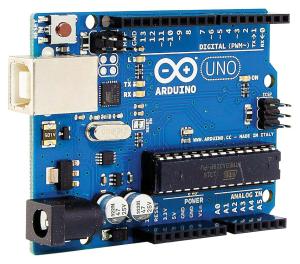
Arduino is a DIY electronics platform based around a software coding environment, and a range of programmable hardware ‘boards’ which can be connected to various electronic devices via inputs and outputs present on the board. These could be buttons, knobs, LEDs, motors, etc, and can be configured to achieve a wide variety of goals. Custom code is written by the user and then uploaded to the board via USB, meaning that applications of the platform are hugely varied.
Whilst there are other far more powerful options available on the market, including those with dedicated DACs (which Arduino does not have), I chose to go with Arduino primarily due to its low cost – you can pick up cheap clone Arduino NANO boards for as little as £3 each. These have 22 I/O pins, with 8 of these able to receive analogue input, and a modest but usable amount of processing power. They are also very small (hence the name!) which is very useful when trying to miniaturise a circuit.
Code wise, the Arduino IDE (Integrated Development Environment) runs on a slightly modified version of the C+ language. This is not something I had used before I started this project, although I found it relatively simple to pick up. Certain libraries of code (such as drivers for particular LED screens or rotary encoder input) are freely available, and I used a few of these within my programming to save myself some time.
The video below shows my first attempt at using Arduino, and is a simple counter with just two inputs – an up button and a down button, and four LEDs to display the current count.
More info about Arduino:

