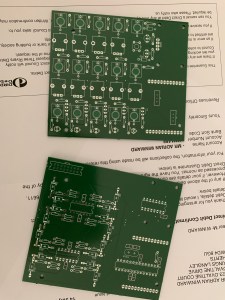
My circuit boards arrived in the post, and they look great!
I had also already ordered the remaining parts to build up a module, so I got the soldering iron out and began construction! Thankfully, all of my parts fitted the board nicely, and I ended up with a very professional looking pair of boards which I am very happy with indeed! All the holes and inter-board connectors lined up perfectly, and using the plastic screw spacers I had purchased the two boards could be easily attached together.
At first glance, all of the components’ heights seem to be close enough that the faceplate will fit on nicely, although this is something I will need to test further down the line. Unfortunately, there was one mechanical problem…
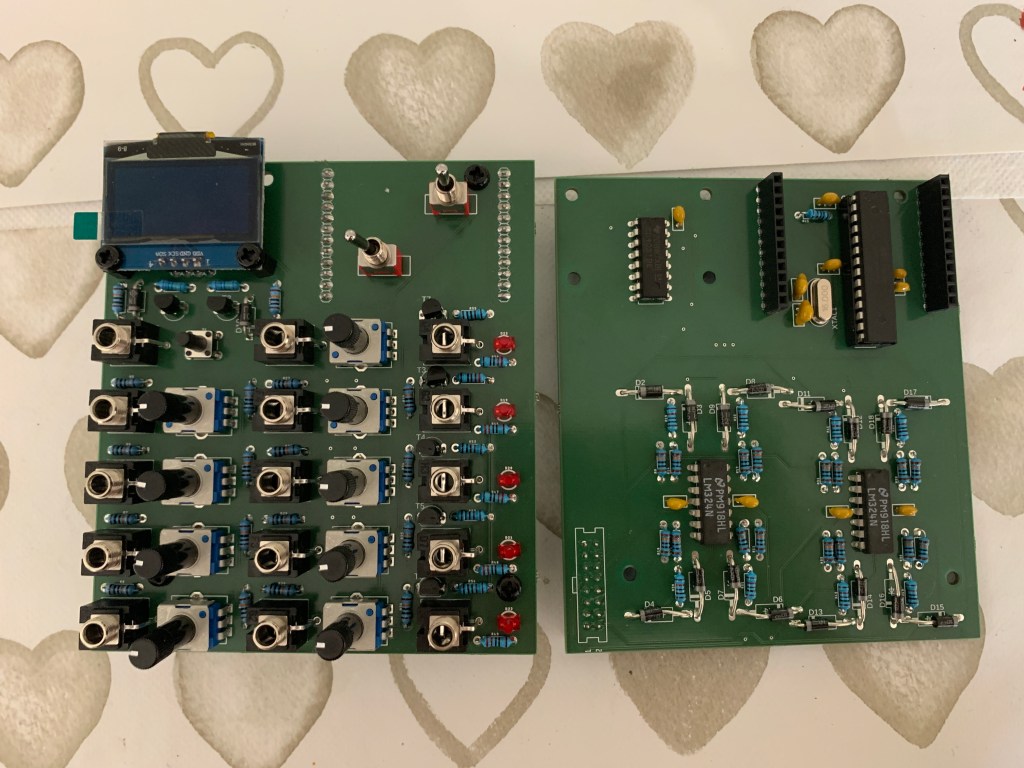
While not immediately apparent in the images here, I had made an error with the size of the display and it overhangs the top of the board! The top two holes do not line up, which is ok as the display is still very securely attached, but the extended size of the module now would not fit into a standard Eurorack case! Thankfully, using a pair of cutting pliers I was able to remove some of the unnecessary structural circuit board at the top of the display and it looks like it should now just about fit a Eurorack skiff, but it will be close!
Powering up the module and testing it revealed a couple of further issues, both caused by the fact that I had rushed my design to get the boards off to the manufacturing plant, and had not properly tested my schematic and circuit before designing the PCB (oops!). These manifested as:
- Output LEDs not blinking.
- Reset Button causing some serious glitching and a burning smell (!) when pressed.
- Reset and Next Step CV inputs not working.
- Steps knobs being in the wrong order (ie: 4-1 instead of 1-4).
Thankfully, these were all fixable!
The knob order was easily rectified by modifying the code – this was a simple mistake that had happened while splitting my schematic in two earlier on.
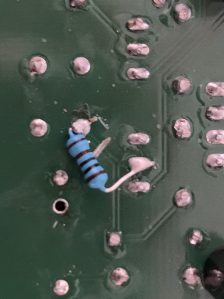
A quick breadboard mock-up of the Reset Button part of the circuit showed that when the button was connected it was connecting 5V directly to ground, and starving the rest of the circuit of current! A simple 1KΩ resistor added between the switch and ground solved this issue, and was simple to implement on the board – I just had to cut the connecting trace with a scalpel and solder the resistor onto the board.
The other two issues were both caused by my choice to normal the jacks to ground when nothing was plugged into them. This seemed to make sense to me at the time of design, but as I did not have the jack sockets in my possession at that time I did not actually test this. The fix here was first to desolder the affected jack sockets, and then remove the part inside the socket that enables the normalling. Once the jacks were resoldered in place the problem was solved, although as they had lost a solder point the sockets were a little less rigid. Once attached to the faceplate I do not see this being an issue, and it will be easy to fix in a future revision of the circuit board as I can simply remove the connection between these pins and the ground plane on the board.
All testing up to this point has been done with a multimeter and breadboard circuits. Once I have a functional faceplate I will be able to install my module in a modular system and test it with other proper modules, but things are looking promising!

