I now needed to document my full circuit plan as a schematic, so that this could then be converted into a circuit board. I used a piece of software called Autodesk Eagle, and then moved across to its big brother Fusion 360 as this has a free student licence – wahoo! I had to do a bit of reading up to understand how to create a neat schematic without wires running everywhere, in particular the use of renaming connected nets was very useful.
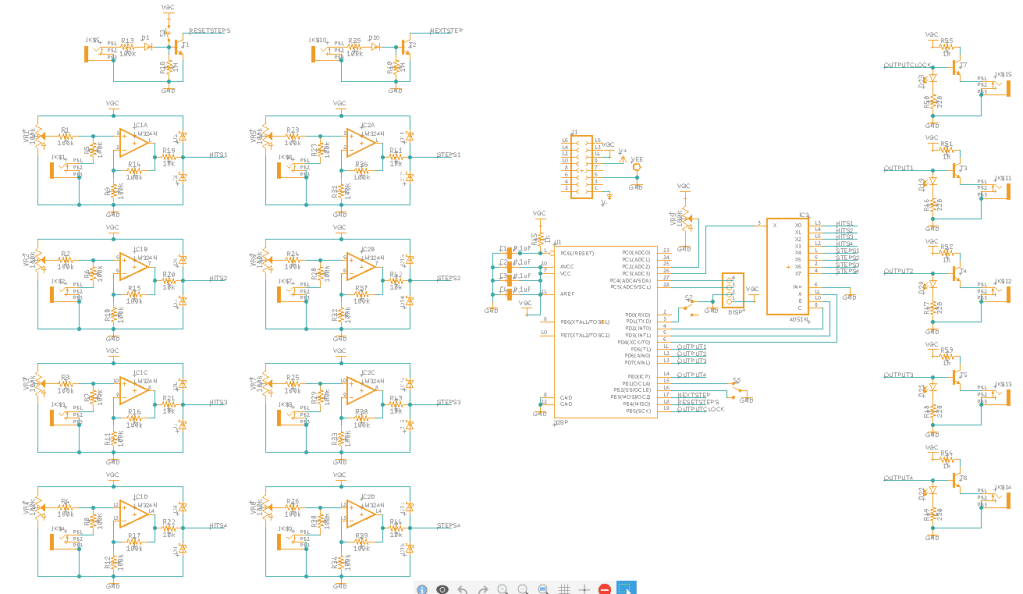
The repeating sections are the inputs and outputs, with the inputs on the left and the outputs on the right. Note that the opamps are actually four to a chip, but these are split out in the schematic to keep things easier to read. The large rectangle in the middle is the main IC, with the mux chip to the right above it.
The small rectangle at the top is the power header. Due to some of the components available in Fusion I had to rename +12V “V+” and -12V “V-” so that it would auto-connect them to the ICs’ power pins.

